Limited Time Offer: Get CrispForms Pro for life at just $149 Claim Now
Conversion-focused HubSpot Forms alternative

CrispForms vs HubSpot Forms:
Which Form Builder Fits Better?

HubSpot Forms is convenient when every lead must live inside HubSpot CRM. CrispForms is better when you want more engaging conversational forms and quizzes that qualify visitors before sending data into your sales workflow.

Competitor type

CRM lead capture forms

Quick verdict

Choose CrispForms when the capture experience itself needs to convert more visitors, not just create CRM contacts.

The Practical Positioning

Both tools can collect responses. The better choice depends on the job your forms need to do.

H

HubSpot Forms

CRM lead capture forms

HubSpot Forms is useful for teams already using HubSpot CRM, landing pages, email, and marketing automation.

Best when you need:

  • Teams fully standardized on HubSpot CRM and marketing automation
  • Simple lead capture forms where direct CRM creation is the main goal
  • Companies that want form management inside their existing HubSpot portal
BEST FOR CONVERSIONS

CrispForms

Conversational forms, surveys, and quizzes

CrispForms focuses on the front-end experience: guided questions, branching, scoring, analytics, and embeds that make lead capture feel less like a static form.

Best when you need:

  • Lead qualification flows with branching and scoring
  • Interactive quizzes that segment prospects before routing them
  • Landing pages where form completion rate is a major growth lever

Feature-by-Feature Comparison

A practical view of how CrispForms and HubSpot Forms compare for everyday form workflows.

Area CrispForms HubSpot Forms Takeaway
CRM integration Can route submissions through common integrations and webhooks. Native inside HubSpot CRM. HubSpot wins for native CRM storage; CrispForms wins for the capture experience.
Lead qualification Branching and scoring fit naturally into the form journey. Lead capture is CRM-centered. CrispForms is stronger when qualification is interactive.
Quizzes Built for product recommendations and score-based segmentation. Forms are mainly CRM data collection tools. CrispForms is better for quiz-driven campaigns.
Embeds Inline, popup, slider, popover, and full-page modes. Standard HubSpot form embeds. CrispForms gives growth teams more presentation options.
Best fit Interactive lead capture, qualification, quizzes, and feedback. HubSpot-native CRM contact collection. Many teams can use CrispForms at the front end and still send leads downstream.

Why Teams Choose CrispForms

CrispForms is intentionally focused on the workflows where form experience directly affects results.

Higher-engagement capture

CrispForms helps turn static lead forms into guided conversations.

Qualification before routing

Use logic and scoring to collect richer context before sending submissions downstream.

Campaign flexibility

Multiple embed modes make it easier to test lead capture across pages and offers.

Migration plan

Switching from HubSpot Forms

Treat migration as a chance to shorten old forms, remove low-value questions, and turn static pages into higher-completion conversations.

  1. 1

    Keep track of the HubSpot fields and lifecycle properties each form currently updates.

  2. 2

    Rebuild the public-facing capture flow in CrispForms with qualification questions.

  3. 3

    Map important answers to downstream workflows through webhooks or integrations.

  4. 4

    Test lead routing, notifications, and CRM updates with sample submissions.

  5. 5

    Replace the old embed on one landing page first and compare completion rate.

Built for Modern Form Workflows

CrispForms combines a polished respondent experience with the practical tools teams need after launch.

AI form generation screenshot in CrispForms

AI form generation

Draft forms from a plain-English prompt, then refine questions, logic, and copy before publishing.

Logic builder screenshot in CrispForms

Logic builder

Create branching paths for lead qualification, feedback follow-ups, product matching, and quizzes.

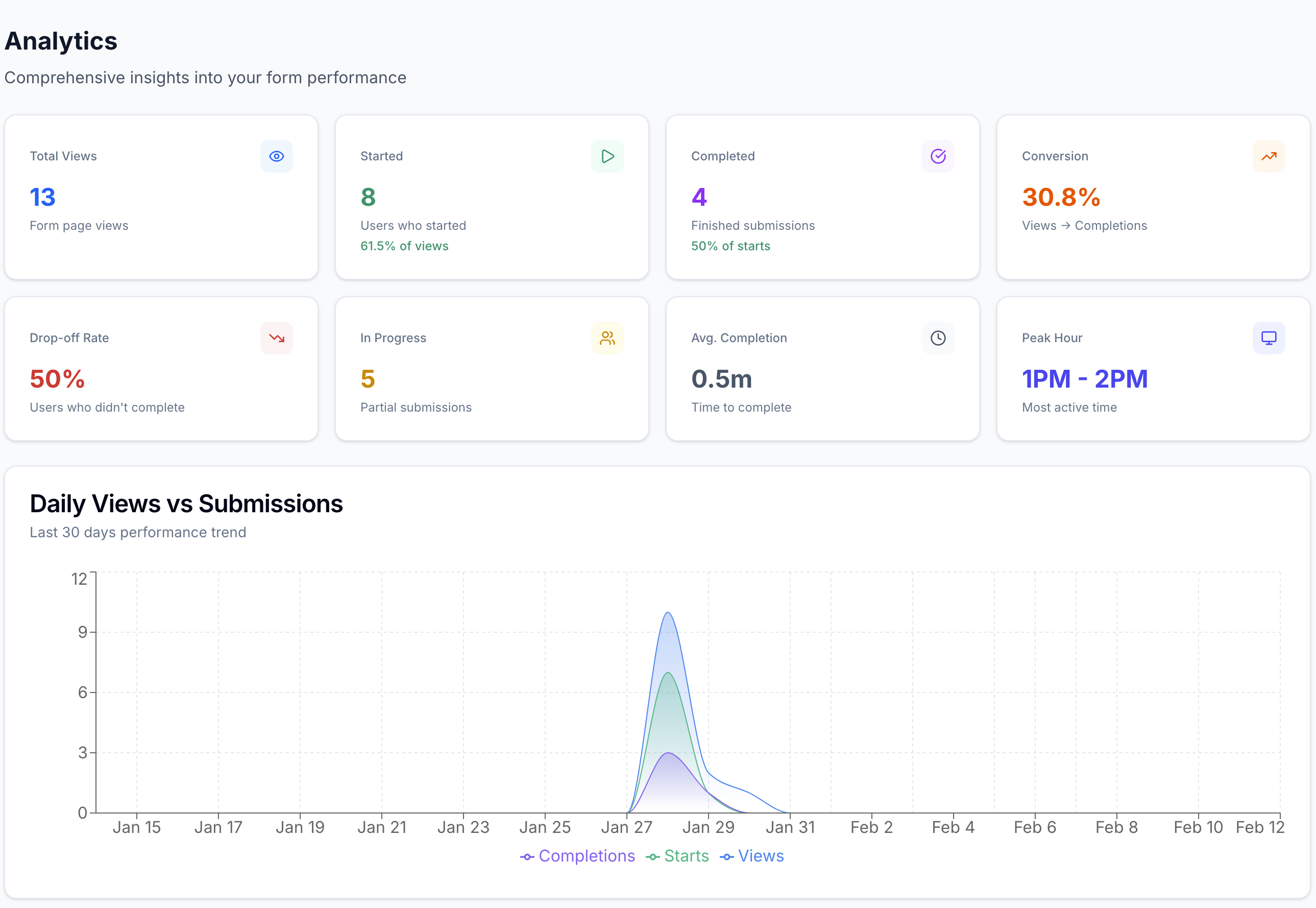
Analytics dashboard screenshot in CrispForms

Analytics dashboard

Track views, starts, completions, and drop-off so every form can improve after launch.

Frequently Asked Questions

Short answers for teams evaluating CrispForms and HubSpot Forms.

Is CrispForms a HubSpot Forms alternative?

Yes. CrispForms is a strong alternative for conversational lead capture and qualification. HubSpot Forms may be better when native HubSpot CRM storage is the only priority.

Can CrispForms send leads to a CRM?

CrispForms can support CRM workflows through webhooks and connected automation tools, depending on your stack.

Why use CrispForms before HubSpot?

Use CrispForms when you want the visitor-facing lead capture experience to be more engaging, segmented, and conversion-focused before the data reaches sales.

Ready to Try a More Conversational Alternative?

Build your first CrispForms form in minutes. Start with a lead form, feedback survey, quiz, registration flow, or any customer-facing form that deserves a better experience.